• Free 3 day delirery and free returns within the US Register or Login
More
  • Login
  • My Account
    • My Account
    • Order History
    • Transactions
    • Downloads
    • Checkout
Your Store
  • Home
  • Electronic
    • MP3 Players
      • Desktops
      • Web Cameras
      • PC
      • Macs
      • Site
        • Web Cameras
        • Mac
        • Software
      • Womens
      • Blog
        layout

        Blog 1 column

        layout

        Blog 2 columns

        layout

        Blog 3 columns

        layout

        Blog 4 columns

        layout

        Blog List

      • Pages
        • About Us
        • Services
        • FAQs
        • Contact us
        • Support 24/7 Page
        • Typography
        • Photo Gallery
        • SiteMap
        • Page 404
        • Coming Soon
      • MarketPlace
        • OpenCart 3 Marketplace
        • OpenCart 2 Marketplace
      call us now: 0123-444-666
      Email: contact@revo.com
      All Departments
      • Fashion
        • Site
          • Components
        • MP3 Players
          • Web Cameras
        • Site
          • PC
        banner
      • Computer
      • Furniture
        • Site
          • Components
          • Mice and Trackballs
          • Monitors
          • Web Cameras
          • Site
            • Components
            • Scanners
        • Smartphone
          • Cameras
            • Components
            • Cameras
            • Components
            • Printers
            • Health & Beauty
              • Monitors
                • Components
                  • Printers
                  • Web Cameras
                  • Desktops
            • Sport Clothing
            • Watch & Jewelry
            • Kitchen
            • Accessories
            • Women Fashion
            • Jewelry & Watches
            • Battereries & Chargers

            My cart

            0 item(s) - $0.00
            • Your shopping cart is empty!

            Sign in Or Register
            Forgot Your Password?

            NEW HERE?

            Registration is free and easy!

            • Faster checkout
            • Save multiple shipping addresses
            • View and track orders and more
            Create an account
            • Home
            • Posts
            • Electric Heating Gloves HG-E008 Manual
            Electric Heating Gloves HG-E008 Manual

            Posted by: admin Created Date: 16 Aug
            Electric Heating Gloves HG-E008 Manual

            Electric Heating Gloves HG-E008

            PRODUCT INTRODUCTION

            HG-E008

            Emida.Top

            Reminder from the store:

            The products you buy have different configurations. Different models will have different ways of operating, please pay attention to the distinction.

            FAQS:
            – Does my product need to be recharged when not in use in the summer?
            – Products with lithium batteries, which should be charged when not in use for a long time. When it is activated again, it will also be charged. Because batteries are easily worn out and damaged at low voltages. Products with dry cell batteries should be removed when not in use.

            – Are there any other language versions of the manual?
            – Please use your browser’s online translation function to translate this page into your desired language.


            Product Introduction


            5V Lithium Battery Electric Heated Gloves Instructions

            Instructions for use

            1.Press and hold the battery for 3 seconds, the white light comes on to enter 1st gear Press and hold to enter 2nd gear, press and hold to enter 3rd gear. Long press the battery for 3 seconds to turn off.

            2.Connect the DC plug of the electric heating product with the DC buckle of the battery. At this time, the switch indicator light stops flashing after showing red, white and blue colors, indicating normal function.

            3.Put the battery into the small battery pocket, long press the switch for 3 seconds, the red light blinks, indicating that the switch is under breathing preheat protection. In the default high temperature mode (continuous heating), the product will gradually warm up within 1 minute until it reaches 150-160F, and then automatically heat up to the medium temperature mode with stabilized white light after 5 minutes (if you manually press the switch in less than 5 minutes, it will also switch to the medium temperature mode with stabilized white light), at which time the temperature will be about 130-140°F. Press the switch again to go to low-temperature mode with a steady blue light and a temperature of approximately 110-120F. If the switch is pressed again, the red light comes on steadily to go to high-temperature mode. The cycle will repeat again. Press and hold for 3 seconds to turn off, the LED will not change color. (For example, if the current mode is steady red light on and long press the switch for 3 seconds, the LED will turn off without changing color because it is turned off).

            4.The duration of 5V/5000mAh lithium battery is about 2 hours – 2.5 hours in high temperature mode , 4 hours – 4.5 hours in medium temperature mode and 6 hours – 6.5 hours in low temperature mode.

            5.If there is no heat inside the glove when you use it, and the switch indicator light is off, it means that the battery is already dead you need to open the battery pack, take out the battery, and charge it with the USB charger that is provided by the companyIf only one battery is charging, it will take about 3 hours to fully charge. If charging both batteries at the same time, it will take about 6 hours to fully charge. You can use it when it is fully charged.

            6.Note: Even if the glove is long-pressed off, the battery must also be long-pressed off.

            Product configuration
            —————-
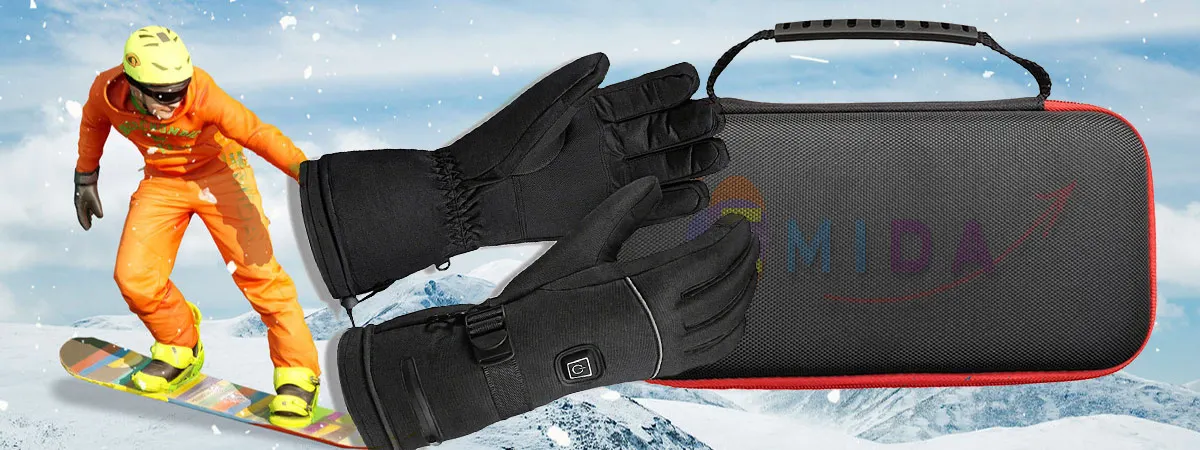
            Three-speed Thermostat Electric G loves 1 Pair
            5V/5000 mAh Lithium Battery 2 PCS
            USB C able 1 Piece

            Emida.Top

            Precautions for use

            1.Turn off in time when not using it to avoid long term heating. Please hold the socket head when plugging and unplugging the DC Connector, and do not pull the wire so as not to break it.

            2.The elderly and children need to use it under the guardianship of an adult who have a good understanding of how to use the product.

            3.Strictly prohibited to excessive bend electric heating products to avoid damage of the heatingbody. This is not a waterproof electronic product, do not wash it in water.Please use a soft brushto clean it and dry it if its surface is dirty.

            4.If the DC Connector falls into water inadvertently please stop using it immediately and continue to use it after air drying.

            5.To Protect your safety, please do not use accessories of other brands with our products, please use the original accessories

            6.Users of lithium batte ries should stop using it immediately after finding it bulges or other abnormal phenomena on the surface of lithium batteries. Do not open the batteries or put them infire. DC not let metal contact or short circuit electrodes . Avoid over heating (over 160°F), humid or corrosive environment. In order to make the best use of lithium batteries, recharge the long term unused lithium batteries every three months for activation and storage at room temperature and dry environment, please use the regular manufacturer’s charger.

            7.For your personal safety please do not use batteries that are not safely certified.

            8.If the product has any quality and safety hazards, please stop using it immediately. After sales servicePlease feel free to contact us if you have any problem with the heated gloves, such as size problem, heating problem, battery problem and so on, we will try our best to give you the best solution.

            Emida.Top

            Product Show

            You can click to enlarge it

            Categories

            • Blogs
            • Experiences
            • Manuals
            • Recommend
            • Sample

            Best Sellers

            Canon EOS 5D
            Canon EOS 5D
            $98.00    $122.00  
            Apple Cinema 30"
            Apple Cinema 30"
            $110.00    $122.00  
            HP LP3065
            HP LP3065
            $122.00
            HTC Touch HD
            HTC Touch HD
            $122.00
            iPod Classic
            iPod Classic
            $122.00
            iPod Nano
            iPod Nano
            $122.00
            free delivery

            From 275 AED

            cash on delivery

            From 275 AED

            free gift box

            & gift note

            contact us

            123 456 789

            Loyalty

            Rewarded

            Our Shops

            • Product Support
            • PC Setup & Support
            • Services
            • Extended Service Plans
            • Community

            My Account

            • My Account
            • Checkout
            • Order History
            • Your Transactions
            • Account Downloads

            Information

            • About US
            • Contact us
            • Warranty And Services
            • Support 24/7 Page
            • Terms And Conditions

            Extras

            • Brands
            • Gift Certificates
            • Affiliates
            • Specials
            • Returns

            Contact Us

            • Address : No 40 Baria Sreet 133/2 NewYork City,NY, United States
            • Email : contact@revo.com
            • Phone 1 : (+0123456789)Phone 2 : (+0123456789)
            Home Categories Mobiles Electronics Accessories Laptop About us Help

            Contrary to popular belief, Lorem Ipsum is not simply random text. It has roots in a piece of classical Latin literature from 45 BC, making it over 2000 years old.

            SIGN UP FOR NEWSLETTER
            Duis at ante non massa consectetur iaculis id non tellus

            Follow Us

            • Facebook
            • Twitter
            • Google+
            • Linkedin
            • Pinterest
            SO Revo © 2015 - 2026. All Rights Reserved. Designed by OpenCartWorks.Com
            imgpayment

            Added to cart successfully. What is next?

            • loader
            • loader
            • Guide Create Social Wickgets Ara

              You please login admin, then select  Extension tab > Modules > Theme Control Panel > Tab Social Wickgets: Please enter data content